Embed your app
Embedding Javelit apps enriches your content by integrating interactive, data-driven applications directly within your pages. Whether you're writing a blog post, a technical document or a demo, embedding Javelit apps adds a dynamic component to your content. This allows your audience to interact with your ideas, rather than merely reading about them or looking at screenshots.
Javelit supports both iframe and oEmbed methods for embedding public apps. This flexibility enables you to share your apps across a wide array of platforms, broadening your app's visibility and impact. In this guide, we'll cover how to use both methods effectively to share your Javelit apps with the world.
Important
This feature is not supported on Safari yet.
Embedding with iframes
To embed a public app, add the query parameter /?embed=true to the end of your app URL.
For example, say you want to embed the Temperature demo app.
The URL to include in your iframe is: https://jbang-production-5e9a.up.railway.app/?embed=true:
<iframe
  src="https://jbang-production-5e9a.up.railway.app/?embed=true"
  style="height: 350px; width: 100%;"
></iframe>
In addition to allowing you to embed apps via iframes, the ?embed=true query parameter also does the following:
- removes the "Built with javelit" bottom right label
- adds a grey "Built with javelit" frame with a link to open the app in fullscreen
Tip
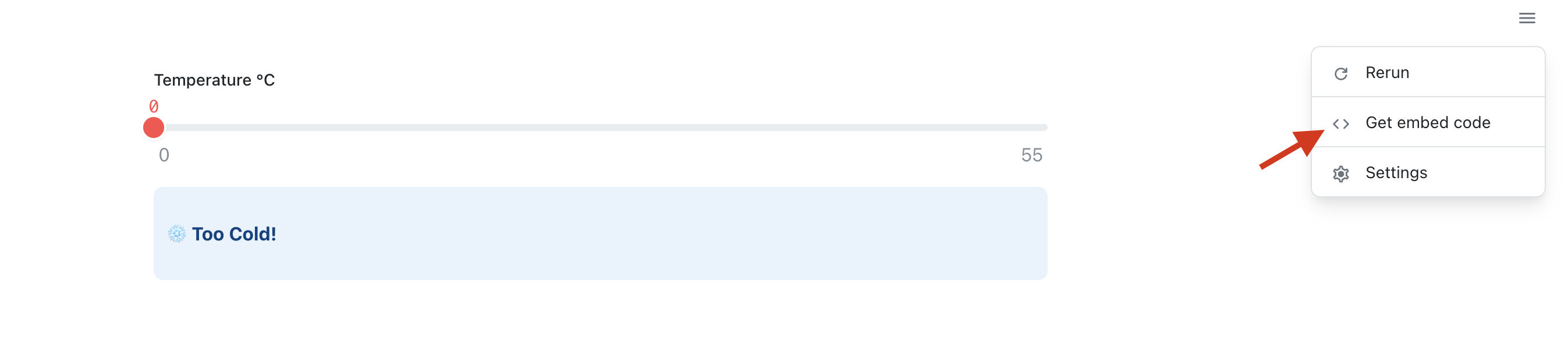
You don't need to write the iframe code manually!
Once your app is deployed, click on the app chrome, then click on Get embed code.
Embedding with oEmbed
Javelit's oEmbed support allows for a simpler embedding experience. You can directly drop a Javelit app's URL into a platform that supports the Oembed protocol, the embedded app will automatically appear!
Well, this is the theory, because major platform like Medium, Ghost, or Notion page requires an Oembed provider URL to be whitelisted
through services like embed.ly and iframely.com.
As of today, the Oembed server is implemented within the Javelit app itself. This means all apps server are their own Oembed server and they
cannot be whitelisted in the services above.
While the current solution is enough to support Oembed in a Wordpress server you own, it won't work with platforms that
require a specific Oembed server to be whitelisted.
We are working on this issue. In the meantime, if you need help to get a whitelisted Oembed server, please reach out on the forum.
Still have questions?
Go to our discussions forum for helpful information and advice from Javelit experts.