Using forms
When you don't want to rerun your script with each input made by a user, Jt.form is here to help! Forms make it easy to batch user input into a single rerun. This guide to using forms provides examples and explains how users interact with forms.
Principle
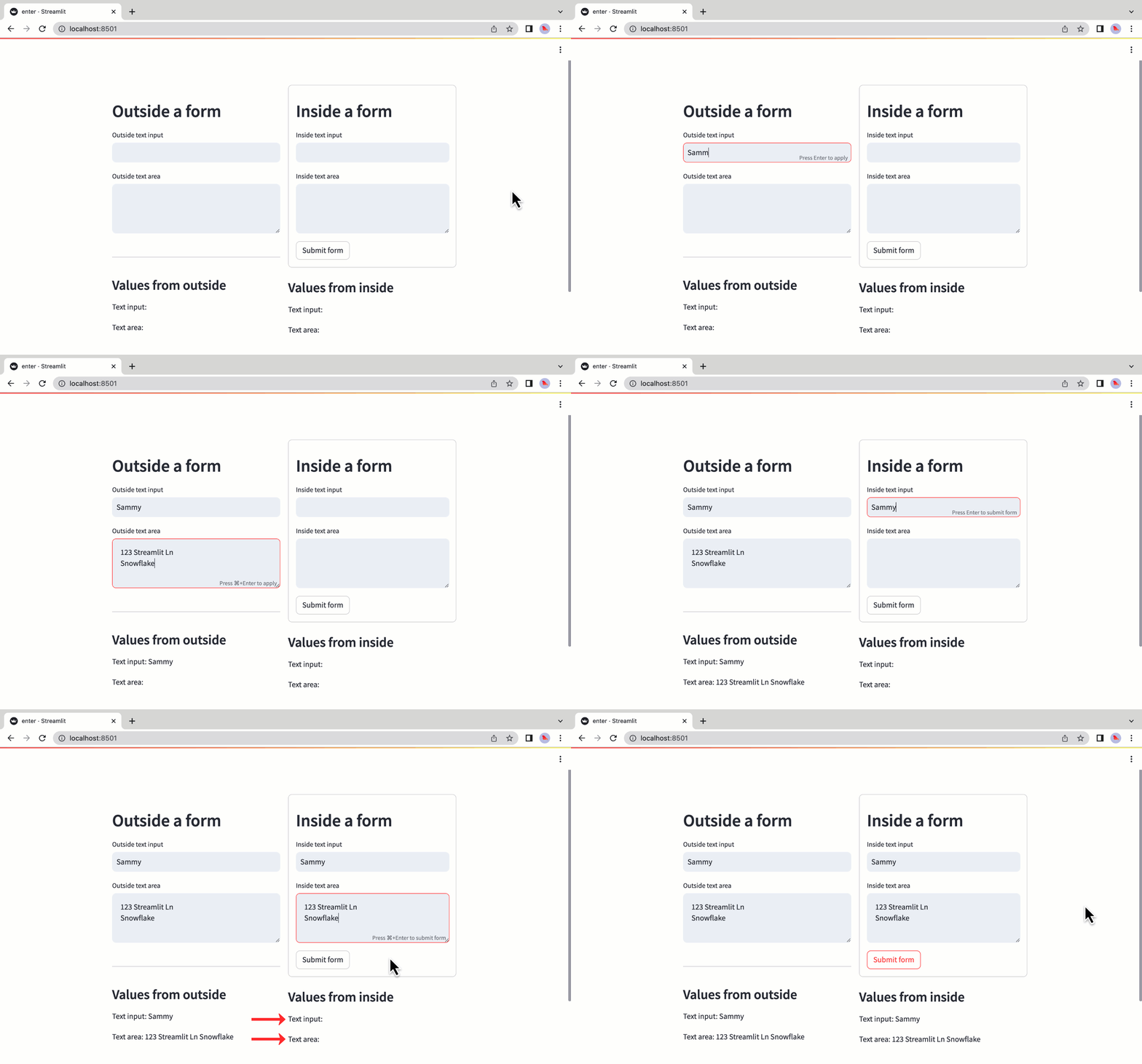
If a widget is not in a form, that widget will trigger a script rerun whenever a user changes its value. For widgets
with keyed input (Jt.numberInput, Jt.textInput, Jt.textArea), a new value triggers a rerun when the user clicks
or tabs out of the widget. A user can also submit a change by pressing Enter while their cursor is active in the widget.
On the other hand if a widget is inside of a form, the script will not rerun when a user clicks or tabs out of that widget. For widgets inside a form, the script will rerun when the form is submitted and all widgets within the form will send their updated values to the Java backend.
Tip
Run the example above with:
javelit run https://raw.githubusercontent.com/javelit/javelit/refs/heads/main/examples/form/FormExample.java
Widget values
Before a form is submitted, all widgets within that form will have default values, just like widgets outside of a form have default values.
var formContainer = Jt.form().use();
double myNumber = Jt.slider("pick a value").value(10).use(formContainer);
Jt.formSubmitButton("Submit form").use(formContainer);

// this is outside the form
Jt.text(myNumber).use();
// at first run will display the default value
// 10
Forms are containers
When Jt.form is called, a container is created on the frontend. You can write to that container like you do with
other container elements. That is, you call .use(containerForm). Additionally, you can place
Jt.formSubmitButton anywhere in the form container.
var formContainer = Jt.form().use();

// This is writing directly to the main container (.use()) Since the form container is
// defined above, this will appear below everything in the form
Jt.text("this text will appear last!").use();

// These components are used in the form container, so they appear inside the form.
// the submit button appears before the slider
boolean formSubmitted = Jt.formSubmitButton("Send value").use(formContainer);
double value = Jt.slider("Pick a value").use(formContainer);
if (formSubmitted) {
  Jt.text("Value sent: " + ).use()
}
Data flow
The purpose of a form is to override the default behavior of Javelit which reruns a script as soon as the user makes a change. For widgets outside of a form, the logical flow is:
- The user changes a widget's value on the frontend.
- The widget's value in
Jt.sessionStateand in the Java backend (server) is updated. - The script rerun begins.
- If the widget has a callback, it is executed as a prefix to the page rerun.
- When the updated widget's function is executed during the rerun, it outputs the new value.
For widgets inside a form, any changes made by a user (step 1) do not get passed to the Java backend (step 2) until
the form is submitted. Furthermore, the only widget inside a form that can have a callback function is
the Jt.formSubmitButton.
Limitations
- Every form must contain a
Jt.formSubmitButton. Jt.buttonandJt.download_buttoncannot be added to a form.Jt.formcannot be embedded inside anotherJt.form.- Callback functions can only be assigned to
Jt.formSubmitButtonwithin a form; no other widgets in a form can have a callback. - Interdependent widgets within a form are unlikely to be particularly useful. If you pass
widget1's value intowidget2when they are both inside a form, thenwidget2will only update when the form is submitted.
Still have questions?
Go to our discussions forum for helpful information and advice from Javelit experts.